How to Check OC Online in Maharashtra: Step-by-Step Guide
Table of Contents
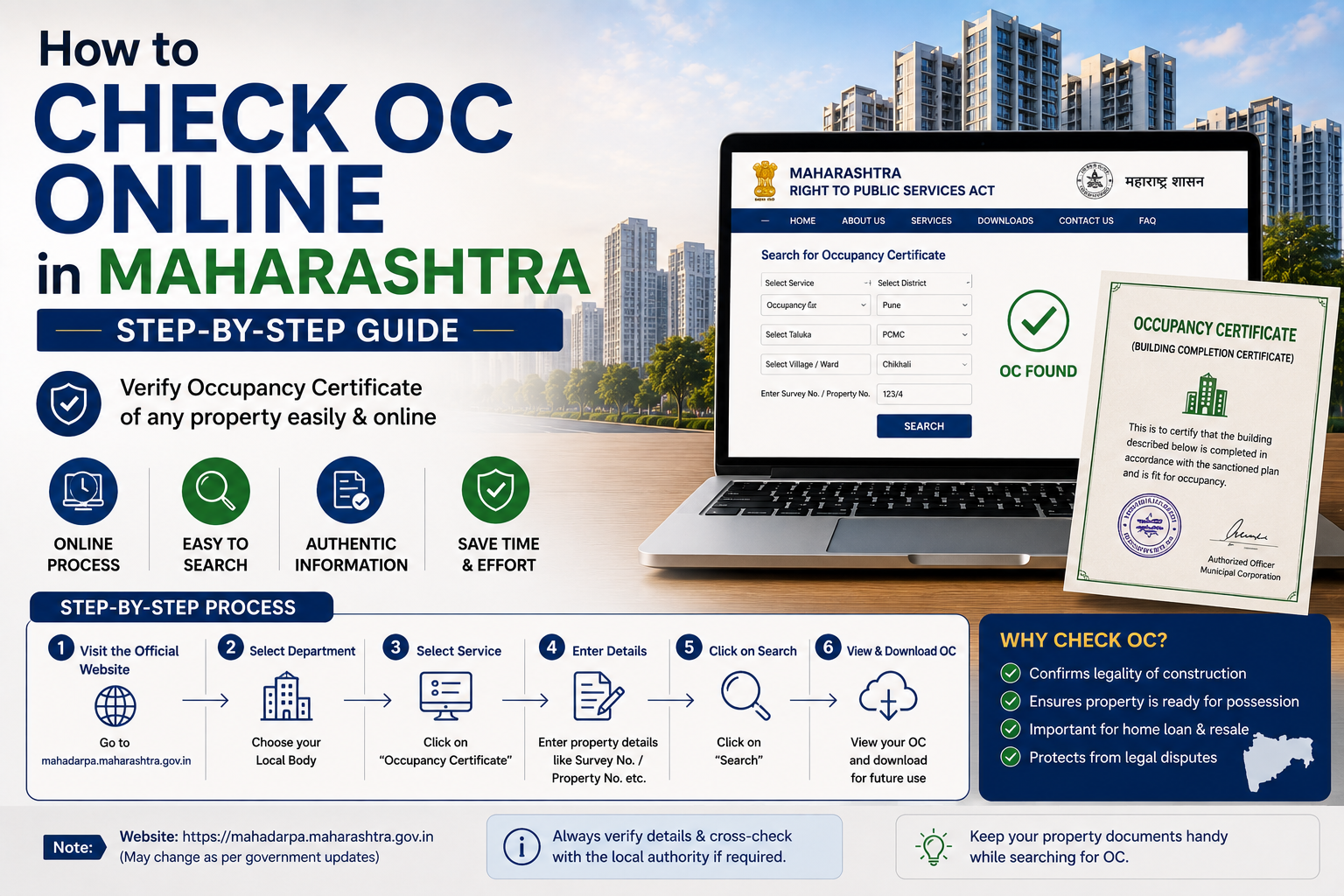
Quick answer: In Maharashtra, you can check a building’s Occupancy Certificate (OC) online through two main routes: the MahaRERA portal (for RERA-registered projects, launched post-2017) and your local municipal corporation’s building-plan portal (MCGM/AutoDCR for Mumbai, PMC/PCMC for Pune, MahaVastu for many other municipal councils across the state). Both are free to use and don’t require you to visit any government office in person.
This guide walks through both methods in full step-by-step detail, city by city, plus what to do if the OC isn’t showing up online a scenario that trips up a surprisingly large number of Maharashtra homebuyers.
1. Why You Need to Check OC Status Before Anything Else
Before getting into the “how,” it’s worth being clear on the “why,” because it shapes which method you should use first.
An Occupancy Certificate confirms that a building has been constructed as per the sanctioned plan and is legally fit for people to live in. In Maharashtra specifically:
- Living in a building without OC is treated as illegal occupation, not just a paperwork gap.
- Utility connections permanent water, sewerage, and electricity are meant to be denied without a valid OC.
- Home loan disbursement (especially the final tranche) is typically withheld by banks until OC is confirmed.
- Resale and khata/property mutation processes get stuck without it.
- MahaRERA has, in the past, initiated prosecution proceedings against homebuyers and developers over undisclosed missing OCs, so verifying this yourself, rather than trusting a builder’s word, is a genuinely important step.
A Part Occupancy Certificate (Part OC) is issued when specific wings or floors of a large project are ready, while the rest of the project is still under construction. A Full OC is issued only once the entire project, including shared amenities, is complete. If you’re checking OC status, note which one you’re actually looking at; a Part OC does not mean the whole project (or its amenities) is cleared.
2. Method 1: Check OC Online via the MahaRERA Portal (Recommended for Most Buyers)
For any residential or commercial project registered under RERA, which covers the large majority of projects launched in Maharashtra after May 2017, this is the fastest and most reliable method, because developers are legally required to upload project documents, including the OC once received, to their MahaRERA project page.
Step-by-Step Process
- Go to the official MahaRERA website, the Maharashtra Real Estate Regulatory Authority’s portal.
- Click on “Registration” in the main menu, then select “Registered Projects.”
- Search for your project by entering the project name, the promoter/builder’s name, or the project’s RERA registration number (this is usually printed on your sale agreement or the builder’s marketing material).
- From the search results, click “View Details” against your specific project.
- On the project details page, scroll to the “Uploaded Documents” or “Documents” section.
- Look for a file labeled “Occupancy Certificate” or “Building Completion Certificate.”
- If it’s listed, click “View” to open it in your browser, or “Download” to save a PDF copy for your records.
What It Means If the OC Isn’t There
If you don’t see an OC listed under Uploaded Documents, it generally means one of three things:
- The building genuinely hasn’t received its OC yet (common for under-construction or recently completed projects).
- The developer has received the OC but hasn’t uploaded it a compliance lapse you can flag directly to MahaRERA.
- You may be looking at a Part OC situation where only some towers/wings have documents uploaded; check whether your specific tower or building number is covered.
Tip: Cross-check the RERA registration number itself for validity on the portal before you rely on any documents linked to it; mismatched or expired registration numbers are a red flag independent of OC status.
3. Method 2: Check OC Online via Your Municipal Corporation’s Portal
Not every building falls under an active RERA project page; older buildings, small independent developments, and projects that predate RERA often won’t have a MahaRERA listing at all. For these, go directly to the municipal body that approved the construction.
3.1 Mumbai MCGM / BMC (AutoDCR Portal)
The Brihanmumbai Municipal Corporation (BMC/MCGM) manages building approvals, completion certificates, and occupancy certificates through its AutoDCR (Building Proposal Approval Management System) portal.
- Visit the MCGM AutoDCR portal.
- Click “Citizen Login” or the relevant public/citizen search option (you generally don’t need to create an account just to check status).
- Enter the details you have on hand application/proposal number, ward number, and building address into the search fields.
- Submit to view the current status of the Completion Certificate (CC) and Occupancy Certificate (OC) for that proposal.
- Where available, you can view or download the digitally signed certificate directly from the portal.
Good to know: BMC has, in recent years, streamlined its process so that OC and Building Completion Certificate (BCC) can be applied for and issued simultaneously in many cases, and system-generated Occupancy Certificates are now available directly through AutoDCR for eligible case types,s meaning more recent Mumbai buildings should show cleaner digital records than older ones.
3.2 Pune PMC and PCMC
Pune’s building approval and OC issuance is split between two civic bodies depending on where the property is located:
- Pune Municipal Corporation (PMC) for properties within Pune city limits.
- Pimpri-Chinchwad Municipal Corporation (PCMC) for properties in Pimpri-Chinchwad.
- PMRDA (Pune Metropolitan Region Development Authority) for certain peri-urban and outlying areas around Pune.
Steps:
- Visit the relevant civic body’s AutoDCR/Single Window Clearance System (SWCS) portal;l PMC and PCMC each run their own version of this system.
- Look for an “Occupancy Search” or “Application Status” option.
- Search using your zone, ward, and building/project name, or the application/proposal number if you have it.
- Review the results for OC or Part OC status against your specific building.
Alternatively, for RERA-registered Pune projects, the MahaRERA route (Method 1 above) is often faster since it consolidates the document directly on the project page rather than requiring you to know the correct ward/zone codes.
3.3 Thane TMC (Mahavastu / Town Planning Portal)
Thane Municipal Corporation building records are accessible through the state’s MahaVastu single-window building plan management system, used by numerous municipal councils across Maharashtra beyond just Mumbai.
- Visit the MahaVastu (Building Plan Management, Urban Development Department, Government of Maharashtra) portal.
- From the online services on the homepage, select “Full Occupancy Certificate” or “Application Status,” depending on whether you’re checking a specific application or searching generally.
- If checking a known application, enter your application number and the council/corporation name (Thane, in this case), then search.
- If you don’t have an application number, use the citizen search option and enter the property/building details you do have: address, ward, or plot details.
3.4 Navi Mumbai CIDCO
Navi Mumbai properties, particularly in CIDCO-developed nodes, are handled separately from MCGM/PMC systems.
- Visit the CIDCO official website.
- Locate the property/building search or occupancy verification section.
- Search using the node number, sector number, and plot number.r CIDCO’s system is organized around this node-sector-plot structure rather than ward numbers.
- Check the listed status for Occupancy Certificate issuance against your specific plot.
3.5 Nagpur, Nashik, and Other Municipal Corporations
Most other Maharashtra municipal corporations (Nagpur Municipal Corporation, Nashik Municipal Corporation, and smaller municipal councils) also route their building-plan approvals through the MahaVastu / AutoDCR family of portals, using broadly the same application-number-and-council-name search pattern described for Thane above. If your city isn’t listed here specifically, search “[your municipal corporation name] AutoDCR” or check the “Town Planning” or “Building Permission” section of that corporation’s official website; the underlying system is usually the same state-provided platform, just branded per-council.
4. Quick Reference Table: Where to Check OC by City/Area
| Location | Primary Portal | What You’ll Need |
| Any RERA-registered project (statewide) | MahaRERA portal | Project name, promoter name, or RERA registration number |
| Mumbai (MCGM/BMC limits) | AutoDCR (MCGM) | Application/proposal number, ward number, building address |
| Pune city | PMC AutoDCR/SWCS | Zone, ward, building/project name, or application number |
| Pimpri-Chinchwad | PCMC AutoDCR/SWCS | Zone, ward, building/project name, or application number |
| Thane | MahaVastu (Town Planning, TMC) | Application number and council name, or property/address details |
| Navi Mumbai | CIDCO portal | Node number, sector number, plot number |
| Nagpur, Nashik, other municipal corporations/councils | MahaVastu / respective AutoDCR portal | Application number and council name |
5. Documents and Details You Should Have Ready
Regardless of which portal you use, keep the following on hand before you start; it will save you multiple failed searches:
- Property’s full address, including ward/zone
- Survey number or plot/gat number
- Building plan approval number or IOD (Intimation of Disapproval) number, if known
- RERA registration number (for RERA-listed projects)
- Builder/promoter’s registered name
- Node, sector, and plot number (for CIDCO/Navi Mumbai properties specifically)
6. What If the OC Isn’t Available Online?
This is one of the most common and most anxiety-inducing situations Maharashtra homebuyers run into, and it deserves more attention than most guides give it. If your search comes up empty:
- Confirm you’re searching the right portal for the right authority. A property under PMC limits won’t show up on an MCGM search, and vice versa; this alone causes a large share of “not found” results.
- Request the OC directly from the developer, in writing, citing your sale agreement and possession terms.
- Check with the Residents’ Welfare Association (RWA); if you’re part of one larger societies often coordinate OC-related follow-up collectively, which developers tend to respond to faster than individual requests.
- Visit or call the relevant ward/zonal office of your municipal corporation directly. Portal downtime, missing uploads, or unindexed older records are common technical gaps, and physical records may still confirm OC status even if the online listing hasn’t caught up.
- File a formal complaint on the MahaRERA portal if the project is RERA-registered and the developer is withholding or delaying the OC. MahaRERA has statutory power to direct developers to comply.
- Escalate to a consumer forum or legal notice as a last resort, particularly if possession has already been taken without OC and the builder remains non-responsive. Indian courts have consistently held that failure to provide OC constitutes a deficiency in service on the developer’s part.
A word of caution: Don’t accept a Completion Certificate, a possession letter, or a “society NOC” as a substitute for the O; C these are different documents serving different legal purposes, and none of them confer the same legal right to occupy the property.
7. Frequently Asked Questions
1. How can I check OC status online in Maharashtra for free? Yes, both the MahaRERA portal and municipal corporation portals (MCGM/AutoDCR, PMC, PCMC, MahaVastu, CIDCO) allow free online status checks; no fee is charged simply to search or view existing records.
2. What is the difference between checking OC via MahaRERA vs. the municipal portal? MahaRERA shows documents the developer has uploaded specifically for that RERA-registered project. The municipal portal (MCGM, PMC, PCMC, etc.) is the original issuing authority’s own record system and is the more authoritative source, especially for older or non-RERA properties.
3. Why is my building’s OC not showing up on MahaRERA? Either the OC hasn’t been received yet, the developer hasn’t uploaded it despite having it, or the project predates RERA registration and was never listed there in the first place. Check the relevant municipal portal as a next step.
4. Can I check OC status for an old building constructed before RERA (pre-2017)? Yes — pre-RERA buildings won’t appear on MahaRERA, but their OC records should still be searchable through the relevant municipal corporation’s portal (MCGM, PMC, PCMC, or MahaVastu), provided the certificate was digitized, or the application number is known.
5. What is a Part OC, and does it mean the building is fully cleared? A Part OC covers only a specific tower, wing, or floor range of a larger project. It does not mean the entire project — including shared amenities like clubhouses or pools is complete or certified. Always check whether your specific unit/tower is covered.
6. What should I do if the builder refuses to share the OC? Request it formally in writing, check the MahaRERA portal for uploaded documents, and if unresolved, file a complaint with MahaRERA or approach a consumer forum. Maharashtra courts and RERA have consistently sided with buyers in such disputes.
7. Is it safe to buy a resale flat if I can’t find the OC online? Treat this as a serious red flag rather than a minor gap. Before proceeding, verify directly with the municipal ward office and insist the seller produce the original OC; banks financing your purchase will likely ask for the same.
Key Takeaways
- Maharashtra offers two complementary ways to check OC status online: the MahaRERA portal (for RERA-registered projects) and your city’s municipal corporation portal (MCGM/AutoDCR, PMC, PCMC, MahaVastu, or CIDCO, depending on location).
- Always check both if the first search doesn’t return results; many older or non-RERA buildings only exist in municipal records.
- Keep your application number, ward/zone details, RERA number, and (for Navi Mumbai) node-sector-plot details ready before you start searching.
- A missing OC online doesn’t automatically mean the building lacks one,e but it’s a signal to verify directly with the developer or municipal office before proceeding with any purchase, loan, or possession decision.
- Never treat a Completion Certificate, possession letter, or Part OC as equivalent to a Full Occupancy Certificate.